


About Camera Vision System for Fisnar ADVANCE Series Dispensing Robots
The FISF4000AKIT-VISION Camera Vision System for Fisnar ADVANCE Series Dispensing Robots is a modular, plug and play add-on to any of the ADVANCE series liquid dispensing robots.
This robot vision system provides a powerful and intelligent CCD vision-based programming and fiducial auto-adjustment system for creating both simple and complex dispense routines/programs. This results in improved quality due to precise dispense positioning alongside improved production yield and reduced processing time and costs.
Dispense programs are created quickly and easily in the Fisnar proprietary vision-controlled Fluid-In-Motion (FIM) software. By using the displayed camera image to move the robot to the exact required dispense location, and then selecting the operation wished to be carried out (dispense, dot, line, start, etc), the system can limit programming inconsistency between operators.
The FISF4000AKIT-VISION robot vision system software is supplied with an auto-part alignment function to guarantee fluid is being dispensed at the exact required location. This is achieved by the system capturing an image of two separate fiducial locations on the component and using pattern recognition software to compare the live image against a stored image. Any difference found in X or Y position results in the dispense coordinates being automatically adjusted to suit.
Dispense positional accuracy and repeatability is further optimised by the simple auto-calibration routine and part alignment function.

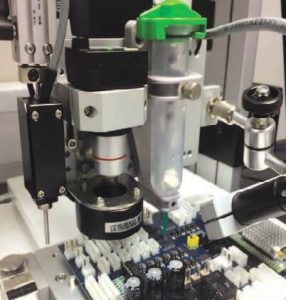
The Robot Vision System comprises two cameras, including one for live dispensing images
Equipment Set-up

1) F4000 ADVANCE Desktop Dispensing Robot
Highly robust and durable based on cast aluminium base and heavy duty extruded aluminium twin vertical side pillars supporting the horizontal X-axis. This rigid design concept allows for long term precision dispensing and dependable repeatability.
2) Computer
Industrial specification PC installed with Windows 10 and supplied with Fluid-In-Motion (FIM) software ready to use. Mounted directly onto robot to reduce overall envelope. TFT LCD monitor, keyboard & mouse also included.
3) CCD Camera
For high resolution colour & greyscale image capturing. Displays an 8x6mm real time image on Fluid-In-Motion (FIM) software. Alternative focus lenses available for special application requirements.
4) LED Ring Light & Controller
For optimising image contrast and definition. Adjustable light brightness controller is mounted directly onto robot to reduce overall envelope.
5) Tip Calibration Module
Works by the camera capturing an image of the purged fluid and uses pattern recognition to compare it against a pre-defined datum image. Any difference found between the centre positions, result in the X & Y co-ordinate values being automatically adjusted and dispense program re-aligning to suit. The Z-axis is automatically calibrated by dispense tip contacting a touch pad.
6) Auxiliary Camera
When robot is running a dispense cycle, a live full screen image is displayed on the TFT LCD monitor, allowing the user to clearly and easily monitor the fluid is being dispensed correctly onto the component part. This ensures any errors can be quickly identified.

Fluid-In-Motion (FIM) software
FAQs
 The Fisnar ADVANCE Camera Vision System is supplied as a complete, validated hardware and software package. Customers sometimes ask whether they can replace the controller PC, install additional software or connect the system to their corporate network. This FAQ explains what is supported and why certain changes may affect performance or warranty.
The questions below cover some of the most common queries we receive about the controller PC, software installation, networking and warranty.
Can I run the CCD module from a standard Windows 11 PC?
No. The embedded Windows 11 operating system supplied with the robot has been specifically configured for the CCD vision system. It includes additional software drivers and operating system settings that are required for correct operation and reliable performance.
Can I install the CCD software on another computer to edit programs or open backups?
Yes. The CCD software can be installed on another Windows PC for program editing and viewing backed-up programs. However, the PC must include a dedicated partition named ‘D:’ for the software to function correctly.
Can I connect the CCD controller PC to my company network?
Yes. The controller PC can be connected to a local network (VLAN) where required for communication within your facility. Connection to an isolated factory network is supported where required. Direct internet access is not recommended because operating system updates, antivirus software and external applications can alter the validated software environment.
Can I install additional software on the controller PC, such as antivirus software?
We do not recommend installing third-party software on the controller PC. Additional applications can alter Windows settings, install background services or introduce software conflicts that may affect the performance and reliability of the robot system.
Will making these changes affect my warranty?
Potentially, yes. The warranty may be void if it is determined that:
- Windows operating system settings have been modified.
- The controller has been connected to the public internet.
- Third-party software has been installed that affects the operation of the system.
These recommendations are based on our experience supporting these dispensing systems in production environments. The objective is not simply to keep the system running today, but to maintain long-term repeatability, minimise downtime and ensure the dispensing process continues to perform as validated.
All Downloads
| Filename | Size | Download |
| Camera Vision System FAQs for Fisnar | 0.24MB |  |
Ordering Information
| Part number | Description |
|---|---|
| FISF4000AKIT-VISION-WIN10 | Camera Vision System for Fisnar ADVANCE Series Dispensing Robots |
|
|
|
 01865 842842 01865 842842 |
 orders@intertronics.co.uk orders@intertronics.co.uk |
